Float Keyboard
A tiny floating ball that opens a dark touch keyboard.
- Raspberry Pi
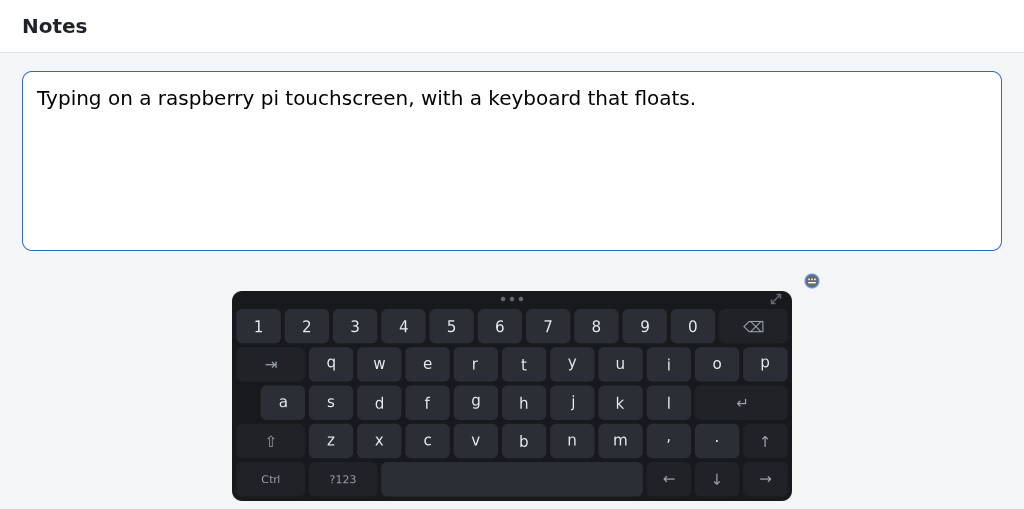
A tiny floating ball that opens a neat, dark QWERTY touch keyboard for your Raspberry Pi touchscreen. It never takes the focus away from what you are typing into, stays until you tap the ball, and — once activated — moves and resizes to fit your screen. Needs the 64-bit Raspberry Pi OS desktop on Wayland (the default since late 2024).
What it does
- A tiny ball floats on top of everything — tap it and a neat, dark QWERTY keyboard appears; tap it again to hide it
- Never steals the focus: tap the address bar or any text box and type — touching anywhere else never hides the keyboard
- Once activated, drag the ball anywhere, move the keyboard and resize it — down to a tiny strip that still types
- Every key works everywhere — Chromium, GTK and older X11 apps — including symbols, arrows, Shift-selection and Ctrl shortcuts
- Web-address keys (https:// www. .com), a symbols layer, key repeat and caps lock
- Installs in your home folder and starts at login, so system updates never remove it — the internet is used once to activate
Runs on
- Raspberry Pi
- Works offline
- No tracking
- Pay once, no subscription